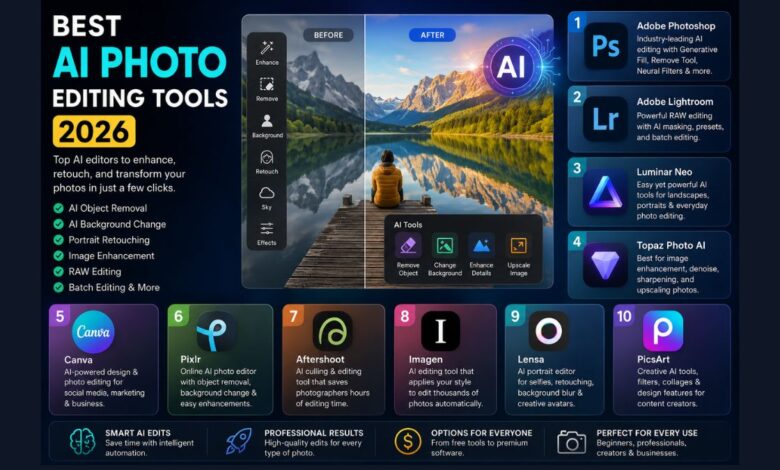
Artificial intelligence has transformed photo editing from a time-consuming task into a fast, creative process. Whether you’re a professional photographer, content creator, online seller, marketer, or someone who simply enjoys improving personal photos, today’s AI-powered editing software can save hours of manual work while delivering impressive results.
In 2026, AI photo editors are smarter than ever. They can remove unwanted objects, replace backgrounds, enhance portraits, reduce noise, sharpen blurry images, edit RAW files, and even generate entirely new content within a photo—all with just a few clicks.
However, not every AI photo editing tool offers the same experience. Some are designed for professionals who need advanced editing capabilities, while others focus on simplicity for beginners. Choosing the right one depends on your workflow, budget, and editing goals.
This guide reviews the best AI photo editing tools available in 2026, comparing their strengths, weaknesses, pricing, and ideal use cases to help you find the perfect option.
What Is an AI Photo Editing Tool?
An AI photo editing tool uses machine learning and computer vision to automate editing tasks that once required advanced skills. Instead of manually selecting objects or adjusting dozens of settings, AI analyzes the image and makes intelligent improvements.
Modern AI editors can perform tasks such as:
- Removing unwanted objects
- Replacing backgrounds
- Enhancing portraits
- Sky replacement
- Noise reduction
- Image sharpening
- Automatic color correction
- AI-powered masking
- Generative Fill
- Image upscaling
- Batch editing
The biggest advantage is speed. Tasks that previously took 30 minutes can often be completed in under a minute without sacrificing quality.
How We Chose the Best AI Photo Editing Tools
To create this list, we considered several important factors instead of focusing on popularity alone.
Editing Quality
The software should produce natural-looking results rather than overly processed images.
AI Features
We looked for tools offering useful AI capabilities, including:
- Object removal
- Background replacement
- Portrait enhancement
- AI masking
- Generative editing
- Denoising
- Upscaling
Ease of Use
The best software should be accessible to beginners while still providing advanced options for experienced users.
Performance
Fast processing and reliable editing are essential, especially for photographers working with hundreds of images.
Value for Money
Price matters. Some users need enterprise-level software, while others prefer affordable or one-time purchase options.
Adobe Photoshop
Best for: Professional photo editing and creative design
Adobe Photoshop remains the industry standard in 2026, thanks to continuous improvements in AI-powered editing.
Recent updates have made complex edits significantly easier through features like Generative Fill, AI object removal, Neural Filters, and intelligent selections.
Key Features
- Generative Fill
- AI Remove Tool
- Smart object selection
- Neural Filters
- Background replacement
- Layer-based editing
- Professional retouching
- Advanced masking
Photoshop is particularly valuable for designers, photographers, advertising agencies, and digital artists who require maximum creative control.
Pros
- Industry-leading editing tools
- Extremely accurate AI features
- Regular updates
- Massive plugin ecosystem
- Supports almost every image format
Cons
- Subscription required
- Steeper learning curve
- More features than casual users may need
Ideal for: Professionals and advanced creators.
Adobe Lightroom
Best for: Photographers editing RAW images
While Photoshop excels at detailed manipulation, Lightroom focuses on managing and enhancing photographs efficiently.
Its AI-powered masking tools can automatically identify skies, people, clothing, faces, eyes, and backgrounds, making local adjustments incredibly fast.
Key Features
- AI masking
- RAW editing
- Portrait enhancement
- Adaptive presets
- Lens correction
- Batch editing
- Cloud synchronization
Lightroom is especially useful for wedding photographers, travel photographers, wildlife photographers, and portrait professionals who edit large collections.
Pros
- Excellent RAW processing
- Fast workflow
- AI masking saves hours
- Great organization features
- Mobile and desktop sync
Cons
- Limited graphic design tools
- Subscription model
Ideal for: Professional photographers and enthusiasts.
Luminar Neo
Best for: Beginners who want professional-quality AI editing
Luminar Neo has become one of the most popular alternatives to Photoshop because it combines powerful AI automation with an intuitive interface.
Instead of spending time adjusting dozens of sliders, users can make impressive edits in just a few clicks.
Standout AI Features
- Sky AI
- Relight AI
- Face AI
- Skin AI
- Portrait Bokeh AI
- Erase Tool
- Background Removal
- Structure AI
One of Luminar Neo’s biggest advantages is its balance between automation and manual control. Beginners can rely on AI suggestions, while experienced users still have plenty of customization options.
Pros
- Beginner-friendly
- Powerful portrait tools
- Fast editing workflow
- Excellent landscape editing
- One-time purchase option available
Cons
- Slightly slower with very large files
- Limited graphic design capabilities
Ideal for: Hobbyists, influencers, travel photographers, and content creators.
Topaz Photo AI
Best for: Improving image quality
If your photos suffer from noise, blur, or low resolution, Topaz Photo AI is one of the strongest AI enhancement tools available.
Rather than replacing your primary editor, it works as a specialized enhancement application.
AI Features
- AI Denoise
- AI Sharpen
- AI Upscale
- Face Recovery
- Motion Blur Correction
- Detail Enhancement
Wildlife photographers, sports photographers, and event photographers often rely on Topaz to rescue images captured in difficult lighting conditions.
Pros
- Outstanding image enhancement
- Excellent sharpening
- Natural-looking results
- Easy workflow
- High-quality upscaling
Cons
- Limited creative editing
- Premium pricing
Ideal for: Photographers focused on image quality.
Canva AI Photo Editor
Best for: Social media creators and small businesses
Canva has evolved far beyond graphic design. Its AI-powered editing tools now allow users to perform many common photo edits without requiring advanced software.
For creators producing marketing content, YouTube thumbnails, blog graphics, Instagram posts, or product images, Canva offers an all-in-one workspace.
AI Features
- Magic Edit
- Background Remover
- Magic Eraser
- AI Image Generator
- Resize tools
- Smart templates
- One-click enhancements
The biggest strength of Canva is convenience. Instead of editing photos in one application and designing graphics in another, users can complete everything in a single platform.
Pros
- Extremely beginner-friendly
- Fast editing
- Excellent templates
- Cloud-based
- Great collaboration features
Cons
- Limited professional retouching
- Less control than Photoshop
Ideal for: Bloggers, marketers, entrepreneurs, educators, and social media managers.
Pixlr
Best for: Quick online photo editing without installing software
If you prefer editing directly in your browser, Pixlr remains one of the most convenient AI-powered photo editors in 2026. It combines ease of use with surprisingly powerful editing features, making it a great choice for students, bloggers, freelancers, and anyone working on different computers.
Pixlr has continued to improve its AI capabilities, allowing users to perform complex edits without needing professional experience.
Key Features
- AI object removal
- AI background removal
- Generative Fill
- One-click image enhancement
- AI cutout tool
- Filters and effects
- Browser-based editing
Since it runs online, you don’t need a high-end computer to perform everyday edits.
Pros
- No software installation required
- Beginner-friendly interface
- Affordable plans
- Fast editing
- Works on most modern browsers
Cons
- Requires an internet connection
- Not ideal for advanced professional retouching
Ideal for: Casual users, students, bloggers, and freelancers.
Aftershoot
Best for: AI culling and batch editing
Professional photographers often return from weddings, sports events, or corporate shoots with thousands of photos. Reviewing every image manually can take hours.
Aftershoot simplifies this process using AI that automatically selects the sharpest, best-exposed, and most expressive images. It also applies consistent edits across an entire photo collection.
Key Features
- AI photo culling
- Batch editing
- Blur detection
- Closed-eye detection
- Duplicate removal
- Style matching
- Lightroom integration
Instead of replacing Lightroom, Aftershoot works alongside it to speed up professional workflows.
Pros
- Huge time savings
- Excellent for large photo collections
- Easy workflow
- Consistent editing
- Designed for professionals
Cons
- Less useful for casual users
- Subscription required for full features
Ideal for: Wedding, sports, and event photographers.
Imagen
Best for: AI-powered editing for professional photographers
Imagen focuses on one goal—editing thousands of photos while maintaining a consistent editing style.
Unlike general-purpose editors, Imagen learns your editing preferences and applies them automatically to new photo sessions.
Key Features
- Personalized AI editing profile
- Batch processing
- RAW photo support
- Lightroom integration
- Cloud processing
- Style matching
Photographers who edit hundreds of client galleries each month can significantly reduce editing time while maintaining consistency.
Pros
- Learns your editing style
- Excellent color consistency
- Fast cloud processing
- Great for high-volume workflows
Cons
- Best suited to professionals
- Requires internet access for cloud processing
Ideal for: Wedding, portrait, and commercial photographers.
Lensa
Best for: AI portrait editing on mobile devices
Lensa remains one of the most popular AI photo editing apps for smartphones. It specializes in portrait enhancement while keeping the editing process simple.
Users can improve selfies with just a few taps without needing advanced editing skills.
Key Features
- AI skin retouching
- Background blur
- Face enhancement
- Color correction
- AI avatar creation
- One-tap portrait editing
Although it’s designed primarily for mobile users, the editing quality continues to improve each year.
Pros
- Easy to use
- Fast editing
- Excellent portrait enhancement
- Great mobile experience
Cons
- Limited desktop workflow
- Some premium features require a subscription
Ideal for: Social media creators, influencers, and everyday users.
PicsArt
Best for: Creative editing and social media content
PicsArt combines AI editing with graphic design tools, making it a versatile option for creators who regularly publish on platforms like Instagram, TikTok, Pinterest, and Facebook.
Its AI tools simplify editing while encouraging creativity.
Key Features
- AI image generator
- AI background replacement
- Object removal
- Artistic filters
- Collage maker
- Text effects
- Stickers and templates
It is particularly useful for creating engaging visual content without switching between multiple apps.
Pros
- Creative editing tools
- User-friendly
- Mobile and desktop support
- Large template library
- Affordable
Cons
- Not designed for advanced RAW editing
- Some features require a premium subscription
Ideal for: Content creators, marketers, and small businesses.
Comparison Table
| Tool | Best For | Platform | Beginner Friendly | Key AI Strength |
|---|---|---|---|---|
| Adobe Photoshop | Professional editing | Windows, Mac | Medium | Generative Fill & advanced editing |
| Adobe Lightroom | RAW photo editing | Windows, Mac, Mobile | Yes | AI masking & batch editing |
| Luminar Neo | Easy professional editing | Windows, Mac | Excellent | Sky replacement & portrait AI |
| Topaz Photo AI | Image enhancement | Windows, Mac | Yes | Denoise, sharpen & upscale |
| Canva | Social media graphics | Web, Mobile | Excellent | Magic Edit & templates |
| Pixlr | Online editing | Web | Excellent | Browser-based AI editing |
| Aftershoot | AI culling | Windows, Mac | Yes | Smart photo selection |
| Imagen | Batch editing | Cloud | Medium | Personalized AI editing |
| Lensa | Mobile portraits | Android, iOS | Excellent | Selfie enhancement |
| PicsArt | Creative editing | Web, Mobile | Excellent | AI creative tools |
Which AI Photo Editing Tool Should You Choose?
The best option depends on how you plan to use it.
Choose Adobe Photoshop if…
- You need professional-level editing.
- You work with layers and composites.
- You want the latest AI-powered creative tools.
Choose Lightroom if…
- You shoot RAW photos.
- You edit large photo collections.
- You need excellent photo organization.
Choose Luminar Neo if…
- You want professional results with less effort.
- You enjoy landscape or portrait photography.
- You prefer a simpler interface.
Choose Topaz Photo AI if…
- Your main priority is improving image quality.
- You frequently work in low-light conditions.
- You need reliable noise reduction and sharpening.
Choose Canva or Pixlr if…
- You create social media graphics.
- You need fast edits.
- You don’t require advanced professional tools.
Tips for Choosing the Right AI Photo Editor
Before purchasing any software, consider these practical factors:
Think About Your Experience
Beginners often benefit from intuitive tools like Canva or Luminar Neo, while experienced editors may prefer Photoshop’s advanced controls.
Consider Your Workflow
Photographers editing hundreds of images each week should prioritize batch editing, AI culling, and RAW support.
Check Device Compatibility
Some applications work only on desktop, while others offer seamless experiences across web and mobile devices.
Compare Pricing
Some tools require monthly subscriptions, while others offer one-time purchase options. Choose the model that fits your budget and long-term needs.
Try Free Versions
Many AI editors provide free trials or limited free plans. Testing a tool before purchasing can help you decide if it suits your workflow.
FAQs
What is the best AI photo editing tool in 2026?
For professional users, Adobe Photoshop remains the top choice due to its advanced AI-powered editing features. For beginners, Luminar Neo offers an excellent balance between simplicity and powerful automation.
Which AI editor is best for beginners?
Canva, Pixlr, and Luminar Neo are among the easiest AI photo editors to learn. They provide intuitive interfaces and one-click editing features that require little to no prior experience.
Can AI edit RAW photos?
Yes. Adobe Lightroom, Adobe Photoshop, Luminar Neo, and Imagen all support RAW photo editing, making them suitable for professional photography workflows.
Are free AI photo editors worth using?
Free versions are great for basic tasks such as background removal, quick enhancements, and simple retouching. However, premium plans usually unlock advanced AI tools, higher export quality, and faster processing.
Which AI tool is best for portrait editing?
Luminar Neo, Photoshop, and Lensa stand out for portrait editing. They offer AI-powered skin smoothing, facial enhancements, lighting adjustments, and realistic background effects.
Can AI completely replace manual photo editing?
Not entirely. AI excels at automating repetitive tasks and speeding up workflows, but skilled editors still play an essential role in making creative decisions, fine-tuning details, and achieving a unique artistic style.
Final Thoughts
AI photo editing has reached an impressive level in 2026, making professional-quality edits more accessible than ever. Whether you’re restoring old family photos, enhancing product images for an online store, or editing thousands of wedding photos, there’s an AI-powered tool designed to fit your needs.
If you want the most advanced editing capabilities, Adobe Photoshop remains the industry leader. Lightroom continues to be the preferred choice for photographers working with RAW files and large image libraries. For users who value simplicity without sacrificing quality, Luminar Neo offers an outstanding balance of intelligent automation and creative control. Meanwhile, Topaz Photo AI is hard to beat for sharpening, denoising, and upscaling images.
The right choice ultimately depends on your experience, budget, and workflow. Take advantage of free trials whenever possible, compare features that matter most to you, and invest in a tool that helps you work faster while producing high-quality results. As AI technology continues to evolve, these editors will only become more capable, giving creators even greater freedom to bring their ideas to life.