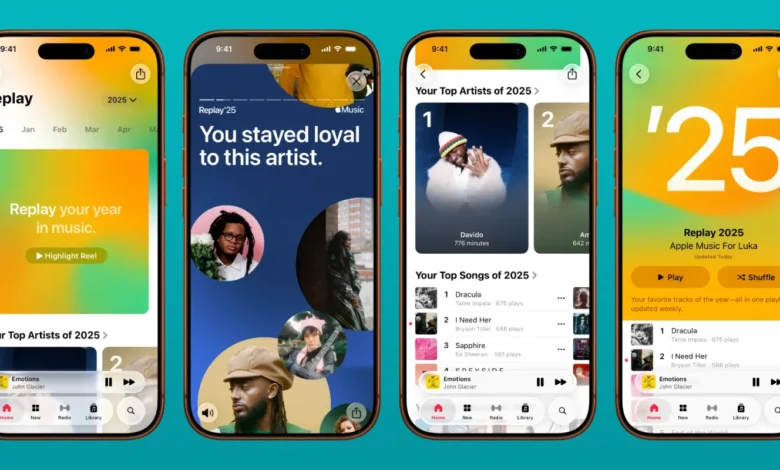
Apple Music Replay is a fascinating feature that gives you a personalized look into your music listening habits throughout the year. Unlike other music summaries, Replay is not just about the songs you love; it provides an in-depth analysis of your favorite artists, albums, and genres. With Apple Music Replay, you can see which songs you played the most, how many times you listened to them, and even how your musical tastes evolved over time. This tool has become an essential companion for music enthusiasts who want to explore their listening patterns in a meaningful way.
How Apple Music Replay Works
Apple Music Replay collects data from your streaming activity on Apple Music. Every time you play a song, album, or playlist, the platform tracks the play counts, listening duration, and frequency. By the end of the year, this data is compiled to generate a Replay summary, which includes your top songs, artists, and albums. Apple Music Replay also creates a curated playlist featuring your most played songs, so you can relive the highlights of your musical year. This process gives you a clear picture of your favorite tracks and how your listening habits have changed over time.
One of the most interesting aspects of Apple Music Replay is its ability to track trends over time. If you consistently listen to certain artists or genres, Replay highlights these patterns and even shows which songs you returned to most frequently. This insight allows you to understand your musical preferences better, and it can help you discover new artists similar to your favorites.
Key Features of Apple Music Replay
Apple Music Replay is more than just a simple list of top songs. It provides several key features that make it a valuable tool for music lovers:
- Top Songs and Artists: Replay highlights your most played songs and the artists you listened to the most. This gives you a clear view of your musical favorites.
- Top Albums and Genres: Beyond individual songs, Replay shows which albums and genres dominated your listening year, allowing you to see trends in your music consumption.
- Total Listening Time: Replay tracks the total minutes you spent listening to music, giving you insight into your engagement and dedication to your favorite tracks.
- Replay Playlists: Your top songs are compiled into a personalized playlist that you can play anytime, share with friends, or revisit throughout the year.
- Yearly Comparison: Apple Music Replay allows you to compare your current year’s listening habits with previous years, providing a unique perspective on your evolving musical tastes.
These features combine to create a comprehensive picture of your listening habits, making Replay both entertaining and informative.
How to Access Apple Music Replay
Accessing Apple Music Replay is straightforward and available directly through the Apple Music app or website. Users need to have an active Apple Music subscription to take advantage of this feature. Once you log in, you can view your Replay playlist and summary statistics. The Replay playlists are updated weekly throughout the year, ensuring that your most recent listening activity is always reflected. This ongoing update helps you track your favorite songs as trends change or new artists capture your attention.
To make the most of Apple Music Replay, it’s recommended to regularly play music through the app rather than offline tracks not streamed through Apple Music. This ensures that your listening habits are accurately recorded and reflected in your Replay summary.
Benefits of Using Apple Music Replay
There are several benefits to using Apple Music Replay that go beyond simple entertainment. Understanding your listening habits can enhance your overall music experience:
- Personalized Insights: Replay gives you a detailed look at the songs and artists you love most, helping you understand your music preferences.
- Music Discovery: By showing patterns in your listening, Replay can guide you toward new artists or genres you might enjoy, making it a valuable tool for discovery.
- Social Sharing: Many users enjoy sharing their Replay playlists with friends or on social media, creating a sense of community around music.
- Reflection and Nostalgia: Replay allows you to reflect on the past year of music and relive memorable moments associated with your favorite songs.
- Enhanced Engagement: Knowing that your listening activity is tracked can encourage you to explore more music, making your Apple Music subscription even more valuable.
By combining these benefits, Apple Music Replay becomes a tool that enriches your music experience and keeps you connected to your musical journey.
READ MORE: Boot Camp Movie: Ultimate Guide, Reviews, and Top Picks
Limitations to Consider
While Apple Music Replay is a powerful tool, it does have some limitations. Not all songs or listening activity may be tracked accurately. For example, songs played offline, purchased tracks not streamed through Apple Music, or radio station listens might not be included in the Replay summary. Additionally, replay only tracks music listened to through your Apple Music account, so sharing accounts or listening across multiple devices might result in incomplete data. Understanding these limitations helps set realistic expectations and ensures that you interpret your Replay data correctly.
Tips for Maximizing Your Apple Music Replay Experience
To get the most out of Apple Music Replay, consider the following tips:
- Stream consistently through Apple Music: This ensures that all of your listening activity is accurately tracked.
- Explore new genres: Replay can help identify areas of interest; try branching out based on your listening patterns.
- Create and share playlists: Use Replay insights to make playlists for yourself and friends.
- Compare yearly trends: Reflect on how your music taste evolves over time to discover new favorites.
- Engage with highlight songs: Replaying your top songs can deepen your connection to your favorite music and improve recommendations.
These strategies will help you fully leverage Apple Music Replay and enhance your overall listening experience.
Why Apple Music Replay Stands Out
Apple Music Replay stands out from other music tracking features because of its attention to detail and personalized approach. It is not just a ranking of popular songs but a comprehensive analysis of your listening habits. By providing total listening time, top artists, top albums, and genre breakdowns, Replay gives you a multi-dimensional view of your music activity. Its curated playlists and visual summaries make it easy to enjoy and share your musical journey with others. This combination of personalization, detailed analytics, and social sharing sets Apple Music Replay apart as a must-use tool for music lovers.
Conclusion
Apple Music Replay is more than just a feature; it is a window into your musical world. By offering detailed insights into your listening habits, top songs, and favorite artists, Replay helps you understand your music preferences while also encouraging discovery and reflection. With its personalized playlists and visual summaries, it provides a unique and engaging way to enjoy music year-round. Whether you want to track your favorite tracks, discover new artists, or simply celebrate your music journey, Apple Music Replay is an essential companion for any Apple Music subscriber.
FAQs About Apple Music Replay
- What is Apple Music Replay?
Apple Music Replay is a feature that tracks your listening habits and creates a personalized summary of your favorite songs and artists. - How often is Apple Music Replay updated?
Replay playlists are updated weekly throughout the year, reflecting your most recent listening activity. - Can I share my Replay playlist?
Yes, you can share your Apple Music Replay playlist with friends or on social media platforms. - Does Replay track offline songs?
No, only songs streamed through Apple Music are tracked; offline or purchased tracks may not be included. - What insights can I get from Apple Music Replay?
Replay provides top songs, artists, albums, genres, total listening time, and trends in your music habits.